Building the Bouncer: A Hands-On Guide to Implementing a KDB/Q Gateway from Scratch
This tutorial picks up right where the Gateway Architecture Design post left off, taking the next step: turning theory into working code. In the previous post, we looked at the gateway as the The Bouncer at the Front Door of Your KDB/Q Stack, deciding who gets in, where queries go, and how the system behaves under load. In other terms: handling routing, access control, load balancing, aggregation, and shielding backend services from unnecessary complexity. In this hands-on tutorial, we will take those concepts and turn them into something concrete by building a gateway step by step, from scratch. If any of the architectural concepts are still a little hazy, take a quick detour back to the architecture post here, this walkthrough assumes you know why the gateway exists and focuses on how to make it real.
From Blank Slate to Gateway: What We’re About to Build
In the following sections we will build the core pieces of a scalable query routing framework inspired by the Query Routing from KX white paper, written by Kevin Holsgrove. The goal is to illustrate a practical, production-ready pattern where multiple processes coordinate to handle user queries efficiently in a distributed KDB/Q system.
But before we dive into the technical implementation of the framework, let’s take a brief step back and look at the system from a higher-level perspective, focusing on the processes we’re about to build and how they fit together. At the center of our design are three key players:
-
Gateway: This process sits at the edge of your system, accepts client requests, annotates them with a unique sequence identifier, and hands them off for routing. Each incoming query is captured in an internal table, tagged with a unique sequence number, and linked back to the client’s process handle. The gateway then asks the load balancer for an available service and forwards the query to whatever worker gets allocated. When the result comes back, the gateway uses the sequence number to match it to the original request and sends the response straight back to the right user.
-
Load Balancer / Connection Manager: Think of this as the brains of query distribution. It knows what services are available (e.g., multiple HDBs, RDBs, or custom compute services), which ones are busy, and which are free to take work. Rather than simple round-robin, this component tags incoming queries and only allocates them to idle backends, minimizing queueing and improving latency.
-
Service Instances: These are the actual workers: database processes, analytics engines, or custom report builders that evaluate user queries. Each one registers itself with the load balancer so it can be included in allocation decisions. Once a service finishes a request, it reports back to the load balancer so it can be assigned another job. By running multiple instances of the same service, for example, HDBs backed by identical data sets or RDBs subscribing to the same tickerplant, we create a shared pool of resources that can be spread across different servers. This opens the door to a hot-hot setup, where the framework can not only distribute load efficiently across available instances, but also seamlessly reroute user queries if a service or host goes down, without clients needing to be aware of the failure.

The Life of a Query
From a user’s perspective, interaction is straightforward. Queries are sent to the gateway handle via a single entry point, the userQuery function, which takes a two-element list: the target service and the query to execute. Communication with the gateway uses deferred synchronous messaging, giving users a familiar request–response model while allowing the system to remain non-blocking under the hood.
Services backing the different database types can be distributed across multiple servers, with the number of instances driven by available hardware and user demand, and configured independently per service type. To keep the focus where it matters, we intentionally keep the gateway’s routing logic simple here and put the spotlight on the load balancer’s role in the system. The flow itself is equally clean. Once a query enters the system, the gateway coordinates with the load balancer to allocate an appropriate service, forwards the request, and waits for the result. Responses are then routed back to the user through the gateway. If something goes wrong, an invalid service request or an error during query evaluation, the gateway propagates a clear error back to the client, keeping failure handling centralized and predictable.
The load balancer, instead of relying on a simple round-robin strategy, takes a more deliberate approach. It actively tracks which service instances are free and only allocates queries to resources that are actually available. Once a service finishes executing a query, it explicitly notifies the load balancer that it’s ready to take on more work, allowing the system to maintain an accurate view of capacity at all times. The only exception to this flow occurs when a service has been allocated but the user disconnects before the query completes. In that case, the gateway steps in and informs the load balancer that the service is no longer needed, ensuring resources are released promptly and not left unnecessarily occupied.
The diagram below shows the full lifecycle of a query as it moves through the system.

Where the Rubber Meets the Road: The Technical Walkthrough
In this section, we’ll roll up our sleeves and walk through the technical implementation of each moving part in the system: the gateway, the load balancer, the backend services, and a client process sending queries through the gateway. We will first outline the key responsibilities and core functionality of each process, so it’s clear what role they play and how they fit together. Once the concepts are in place, we’ll look at how they’re implemented in practice. The full codebase for this walkthrough is available in the DefconQ GitHub repository, for anyone who wants to explore, run, or extend it themselves.
Gateway
At its core, the gateway maintains two tables, one for tracking available backend services and another for tracking incoming user queries, along with a small set of functions that coordinate communication between the client, the gateway, and the load balancer. In the following sections, we will break these pieces down and explain how they work together.
The services Table
The services table keeps track of all backend services currently available to the gateway. It is implemented as a keyed table, with the backend service address as the key. For each entry, the table stores the service name as well as the corresponding connection handle. Note that this handle represents the IPC connection established from the gateway to the backend service, not the client connection.
services:([address:()] serviceName:();sh:());
The userQueries Table
The userQueries table records every query that enters the gateway. This is also a keyed table, using a unique sequence number as the key. The sequence number is a simple counter that increments with each new incoming query. Alongside it, the table captures the user handle that submitted the query, the timestamp when the query was recorded, the timestamp when it was forwarded to a backend service, the timestamp when the result was returned, the user name, the service handle and service name associated with the execution, and finally the query itself. Together, this table provides full visibility into the lifecycle of each request as it flows through the gateway.
userQueries:([sq:`int$()] uh:`int$(); rec:`timestamp$(); snt:`timestamp$(); ret:`timestamp$(); user:`$(); sh:`int$(); serv:`$(); query:());
The connectToLoadbalancer Function
The connectToLoadbalancer function is responsible for establishing the IPC connection from the gateway to the load balancer. It opens the connection and stores both the original handle, a positive handle used for synchronous communication, and its negative counterpart for asynchronous messaging, which is how most interactions will be handled. If the connection attempt fails, the function simply reports an error.
connectToLoadbalancer:{@[{NLB::neg LB::hopen x};`:localhost:1234;{show x}]};
The registerGatewayWithLoadbalancer Function
The registerGatewayWithLoadbalancer function then performs the initial handshake with the load balancer. It sends a synchronous message invoking the registerGW function on the load balancer. While we will explain the inner workings of the load balancer later, at a high level this call registers the gateway and returns the full set of backend services currently known to the load balancer. The gateway uses this response to populate its internal services table via the addService function. This exchange is deliberately synchronous: just like a real-time subscriber registering with a tickerplant, the gateway must wait for this response before continuing its startup sequence.
If you’d like to go deeper into IPC in KDB/Q or the mechanics of the tickerplant, check out the dedicated posts linked in the resources section at the end of this article.
registerGatewayWithLoadbalancer:{addService LB(`registerGW;`)};
The addService Function
The addService function updates the gateway’s internal service table with the details of all available backend services. As part of this process, it establishes a direct IPC connection from the gateway to each backend service and then upserts the corresponding entries into the services table with the relevant connection and service metadata.
addService:{ `services upsert `address xkey update sh:{hopen first x}each address from x };
The getData Function
The getData function is the main entry point into our KDB/Q system, the front door to the data warehouse, the “open sesame” to whatever insights are hiding behind your data points. It’s also the first place where the gateway logic starts to get a little more interesting, so it’s worth walking through it line by line.
We begin with a simple conditional check that splits execution into two paths. First, we verify whether the service the user is trying to query actually exists. If it does, the gateway logs the query along with all its metadata, increments the global sequence number, and then asks the load balancer to allocate the next available backend service capable of handling the request. From there, the query continues its journey through the system. In the (hopefully rare) case where the requested service does not exist, the gateway immediately returns a clear error message to the client, and that's where this particular query’s very short life comes to an end.
Remember, the getData function expects a tuple, a two-element list, where the first element specifies the name of the service to query, and the second element contains the actual query the user wants to execute.
getData:{
  $[(serv:x 0) in exec distinct serviceName from services;
    [userQueries,:(SEQ+:1;.z.w;.z.p;0Np;0Np;.z.u;0N;serv;x 1);
      NLB(`requestService;SEQ;serv)];
    (neg .z.w)(`$"Service Unavailable")] };
The serviceAlloc Function
The next function we look at is serviceAlloc. This function is called by the load balancer once it has identified an available backend service and is returning its address to the gateway. At this point, the gateway once again uses a conditional check to determine whether the user who originally submitted the query is still around and waiting for a response, after all, client processes can disappear for any number of reasons.
To make this determination, the gateway looks up the query in the userQueries table, which tracks all active requests. This works because the sequence number assigned to the query was passed to the load balancer when the gateway initially requested a free service, and is now returned alongside the allocation. That sequence number lets the gateway reliably match the allocation back to the correct query.
If the user is no longer waiting, there’s nothing left to do. The gateway simply releases the backend service by calling releaseService on the load balancer, freeing it up for other work. If the user is still waiting, the gateway sends an asynchronous message to the allocated backend service, invoking the queryService function to kick off execution. Finally, the gateway updates the query’s metadata in the userQueries table and continues with the normal execution flow.
serviceAlloc:{[sq;addr]
  $[null userQueries[sq;`uh];
    NLB(`releaseService;sq);
    [(neg sh:services[addr;`sh]) (`queryService;(sq;userQueries[sq;`query]));
    userQueries[sq;`snt`sh]:(.z.p;sh)]]};
The returnRes Function
Next up is the function that closes the loop and delivers the result back to the client. The returnRes function is called by the backend service once it has finished executing the user’s query. It receives a tuple, a two element list, where the first element is the sequence number of the query and the second element is the actual result containing the requested data.
Using the sequence number, the gateway looks up the corresponding entry in the userQueries table and retrieves the handle of the waiting client. If the client is still connected, the gateway sends the result back to the user. As a final step, it updates the timestamp marking when the response was returned. With that, the lifecycle of this query comes to a close, and the gateway is ready to handle the next request.
returnRes:{[res]
  uh:first exec uh from userQueries where sq=(res 0);
  if[not null uh;(neg uh)(res 1)];
  userQueries[(res 0);`ret]:.z.p };
The .z.pc Function
One important edge case to cover is what happens when a connection to the gateway is dropped. We handle this by overriding the default behaviour of the internal system function .z.pc with gateway-specific logic. This allows us to clean up properly and ensure no KDB/Q process is left hanging indefinitely.
The cleanup happens in stages. First, we null out the user handle for all entries in the userQueries table where the handle matches the disconnected client. Next, we remove any backend services whose service handle corresponds to the dropped connection. Rather than branching with conditional checks, we simply delete matching rows, if there’s no match, nothing happens.
If the disconnected handle belongs to a backend service, we then identify all affected, still-waiting users and return an appropriate “Service Disconnected” error message. Finally, we check whether the dropped connection was the load balancer itself. If so, the gateway broadcasts an error to all clients with outstanding queries, closes all backend service connections (since no further allocations are possible), clears the services table, and updates the sent and return timestamps for all in-flight queries.
As a last step, the gateway resets its load balancer state and arms a timer with a 10-second interval, attempting to re-establish the connection to the load balancer every ten seconds until it’s back online.
.z.pc:{[handle]
  update uh:0N from `userQueries where uh=handle;
  delete from `services where sh=handle;
  if[count sq:exec distinct sq from userQueries where sh=handle,null ret;
    returnRes'[sq cross `$"Service Disconnect"]];
  if[handle~LB;
    (neg exec uh from userQueries where not null uh,null snt)@\:`$"Service Unavailable";
    hclose each (0!services)`sh;
    delete from `services;
    update snt:.z.p,ret:.z.p from `userQueries where not null uh,null snt;
    LB::0; NLB::0; value"\\t 10000"] };
The .z.ts Function
Last but definitely not least, we wire up the function that should fire whenever the internal timer ticks by assigning it to the system hook .z.ts. On each trigger, the gateway attempts to open a connection to the load balancer and, if successful, proceeds to register itself by calling registerGatewayWithLoadbalancer.
To keep things robust, the whole sequence is wrapped in a trap, f anything goes wrong, we catch it and return a meaningful error instead of letting the gateway stumble forward in an undefined state. Better safe than sorry. Once the connection is established and the gateway is successfully registered, we shut the timer back down by resetting the interval to zero. At that point, the gateway, the load balancer, and the backend services are all in sync and fully operational.
z.ts:{
  connectToLoadbalancer[];
  if[0<LB;@[registerGatewayWithLoadbalancer;`;{show x}];value"\\t 0"] };
Loadbalancer
Now that the gateway has done its job of funnelling user queries, it’s time to meet the load balancer, the quiet workhorse that decides who actually does the heavy lifting. Think of it as mission control: it keeps a live view of available backend services, queues incoming requests from the gateway, and tracks every gateway currently plugged into the system. Backed by a small set of purpose-built tables and a handful of core functions, the load balancer is responsible for making sure work is assigned efficiently, safely, and at the right time. In the sections that follow, we’ll break down these building blocks and walk through the logic that keeps everything moving.
The services Table
This table tracks all available service instances and the gateways currently consuming them. It is keyed by the backend service handle and records the service address, service name, the gateway handle currently assigned to the service, the sequence number of the query being processed, and the corresponding timestamp.
services:([handle:`int$()] address:`$(); serviceName:`$(); gwHandle:`int$(); sq:`int$(); udt:`timestamp$());
The serviceQueue Table
The serviceQueue table keeps track of all requests waiting for an available resource. It is keyed by the gateway handle the request originated from and the corresponding service request sequence number. In addition, it records the target service name and the timestamp marking when the request reached the load balancer.
serviceQueue:([gwHandle:`int$();sq:`int$()] serviceName:`$(); time:`timestamp$());
The gateways List
The load balancer also keeps a lightweight list of gateway handles, aptly named gateways, which tracks all gateways currently connected to it.
gateways:()
The registerGW Function
To track which gateways are connected to the load balancer, we maintain a simple list of gateway handles. New entries are added via the registerGW unction. When a gateway connects, this function records its handle and immediately responds with the full set of currently available backend services. Armed with this information, the gateway can populate and synchronise its internal service table with the service names and addresses known to the load balancer.
registerGW:{gateways,:.z.w ; select serviceName, address from services};
The registerService Function
Gateways matter, but without backend services there’s nothing to route to. To onboard a newly connected backend, we define the registerService function. It takes the service name and address and upserts the entry into the load balancer’s services table. Since this service is now part of the ecosystem, its details must be broadcast to all connected gateways. We do this using the each-left iterator, invoking addService on every registered gateway handle with the relevant metadata. Once that propagation is complete, the service is marked as available and ready to take work.
registerService:{[name;addr]
  `services upsert (.z.w;addr;name;0N;0N;.z.p);
  (neg gateways)@\:(`addService;enlist`serviceName`address!(name;addr));
  serviceAvailable[.z.w;name] };
The sendService Function
When a gateway asks the load balancer for an available backend, we need a clean way to hand that information back. That’s the job of the sendService function. It selects a free backend service, returns its handle and address to the gateway, and immediately invokes the gateway’s serviceAlloc function so the user query can be forwarded to its final destination.
If you look closely at the implementation, you’ll notice the use of raze when constructing the message sent back to the gateway. At first glance this might seem a little odd, but it’s entirely intentional. Indexing into the services table by handle yields the sequence number and address, which we then combine with the symbolic name of serviceAlloc.
q)services
handle| address   serviceName       gwHandle sq udt
------| ---------------------------------------------------------------------
7     | :mac:2222 EQUITY_MARKET_RDB             2026.02.10D22:13:43.941150000
q)services[7;`sq`address]
0Ni
`:mac:2222
q)(`serviceAlloc;services[7;`sq`address])
`serviceAlloc
(0Ni;`:mac:2222)
q)0N!(`serviceAlloc;services[7;`sq`address])
(`serviceAlloc;(0Ni;`:mac:2222))
`serviceAlloc
(0Ni;`:mac:2222)
Without raze, this produces a two-element list: the function name and a tuple containing the arguments. That would cause serviceAlloc to be called with a single list argument, which is not what we want. Since serviceAlloc expects two atomic parameters, we flatten the structure with raze, ensuring the function is invoked with the correct argument shape.
q)raze (`serviceAlloc;services[7;`sq`address])
`serviceAlloc
0Ni
`:mac:2222
q)0N!raze (`serviceAlloc;services[7;`sq`address])
(`serviceAlloc;0Ni;`:mac:2222)
`serviceAlloc
0Ni
`:mac:2222
Full implementation:
sendService:{[gw;h]neg[gw]raze(`serviceAlloc;services[h;`sq`address])};
The requestService Function
Before we can dispatch a free backend to a gateway, we first need to receive and process the request. That responsibility sits with the requestService function. It takes two parameters: the sequence number assigned by the gateway and the symbolic name of the backend service that should handle the user’s query.
The first step inside requestService is resource discovery. We query the services table for a row where the service name matches the requested service and the gateway handle column is null. In other words, a service instance that is currently idle and not allocated to another gateway. Availability is not assumed; it is explicitly verified.
If a suitable service is found, we immediately log the request in the serviceQueue table via addQueryToQueue. This gives us traceability and ordering. We then update the services table itself, assigning the backend instance to the requesting gateway, recording the query’s sequence number, and stamping the allocation time. At this point, the resource is officially reserved.
With the bookkeeping done, we send the handle of the allocated backend service to the gateway. From there, the gateway takes over and forwards the client’s query to its final destination, the backend service that will actually execute it.Clean allocation. Clear state.
requestService:{[seq;serv]
  res:exec first handle from services where serviceName=serv,null gwHandle;
  $[null res;
    addQueryToQueue[seq;serv;.z.w];
    [services[res;`gwHandle`sq`udt]:(.z.w;seq;.z.p);
      sendService[.z.w;res]]] };
The addQueryToQueue Function
If an incoming request cannot be processed immediately, it needs to be parked in the serviceQueue table. That’s precisely the role of the addQueryToQueue function. It takes the query’s sequence number, the target service name, and the gateway handle from which the request originated, and inserts this information into the queue table. As part of the process, it also stamps the entry with the current timestamp, ensuring we retain a clear record of when the request entered the load balancer.
addQueryToQueue:{[seq;serv;gw]`serviceQueue upsert (gw;seq;serv;.z.p)};
The releaseService Function
Once a backend service has either completed a client request or the client has disconnected and no longer requires a response, the service instance must be freed and marked as available again. That responsibility falls to the releaseService function.
If releaseService is triggered by a backend service, meaning the query was successfully processed, we simply call serviceAvailable with the relevant service details, marking the instance as idle and ready for new work. If, on the other hand, releaseService is invoked by a gateway, this signals that the client disconnected before the result was returned. In that case, we identify the backend service that was allocated to that query using the gateway handle and the query’s service name, and then call serviceAvailable with those details. Either way, the outcome is the same: the resource is returned to the pool and can be reassigned.
releaseService:{
  serviceAvailable . $[.z.w in (0!services)`handle;
    (.z.w;x);
    value first select handle,serviceName from services
      where gwHandle=.z.w,sq=x ] };
The serviceAvailable Function
The releaseService function delegates some of the workload to the serviceAvailable function. This function determines whether the freed resource should simply be marked as idle or immediately reassigned to the next waiting request. In doing so, it updates both the services and serviceQueue tables to reflect the new state.
The first step is to retrieve all gateway handle and sequence number combinations from the serviceQueue where the service name matches the backend service being released. Thanks to KDB/Q's left-of-right evaluation efficiency, we can directly extract the first gateway/sequence pair from that result set, effectively identifying the next request in line.
We then remove that entry from the serviceQueue and update the services table with the allocation details. If a queued request exists, the backend service is immediately reassigned, and its handle is sent to the corresponding gateway so processing can continue without delay. If no matching requests remain, the execution flow stops there. This means the service is simply marked as available and waits for the next allocation.
serviceAvailable:{[zw;serv]
  nxt:first n:select gwHandle,sq from serviceQueue where serviceName=serv;
  serviceQueue::(1#n)_ serviceQueue;
  services[zw;`gwHandle`sq`udt]:(nxt`gwHandle;nxt`sq;.z.p);
  if[count n; sendService[nxt`gwHandle;zw]] };
The .z.pc Function
The final piece on the load balancer side mirrors the gateway’s approach: we override the system function .z.pc to handle disconnections cleanly and deterministically.
When a process disconnects, the first step is to remove its handle from the services table. If the disconnected handle does not belong to a backend service, the table remains unchanged, no branching logic required. We then apply the same logic to the list of registered gateways, removing the handle if it belongs to a gateway; otherwise, the list stays as is.
Next, we clean up the serviceQueue by deleting any outstanding requests submitted by the disconnected gateway. If the originating gateway is no longer alive, there is no client to receive the result, making those queued queries obsolete.
Finally, we check whether any backend service is currently allocated to the gateway that just dropped. If so, we release that resource by resetting the occupying gateway handle to null. A disconnected gateway cannot hold onto a backend service, and the system must reflect that immediately.
And with that, the load balancer is fully implemented, its responsibilities defined, its edge cases handled. The routing layer is now operational, and we can shift our focus to building a simple backend service to complete the architecture.
Backend Service
In the next section, we’ll walk through the implementation of a simple backend service. For the purpose of this tutorial, we’ll assume the backend represents an equity real-time database (RDB) exposing two dummy tables: trade and quote. Alongside the data itself, we’ll store the service name and the connection details required to register with the load balancer.
At the core of the backend sits the execQuery function, responsible for executing incoming client queries. However, to prevent a malformed or poorly written query from destabilising the service, we don’t expose execQuery directly. Instead, it is wrapped inside queryService, where we use a trap to safely execute the request and contain potential errors.
Let’s break down each of these components in detail.
The connectToLoadbalancer Function
The first function we’ll examine is connectToLoadbalancer. Its purpose is straightforward: establish a connection between the backend service and the load balancer. The load balancer’s host and port are hardcoded within the function and used to initiate the connection.
Once connected, the backend stores both the positive handle (for synchronous communication) and the negative handle (for asynchronous calls). To ensure robustness, the entire connection attempt is wrapped in a trap, so any failure results in a controlled error rather than an unhandled exception.
connectToLoadbalancer:{@[{NLB::neg LB::hopen x}; `:localhost:1234; {show "Can't connect to Load Balancer-> ",x}]};
The serviceDetails List
The serviceDetails list acts as a parse tree that is sent to the load balancer immediately after a connection has been established. Its first element is the symbolic name of the registerService function, followed by the service name and the backend service’s address as arguments. When transmitted, this structure invokes registerService on the load balancer side, effectively registering the backend service and making it known to the system.
serviceDetails:(`registerService; serviceName; `$":" sv string (();.z.h;system"p"));
The execQuery Function
The function that ultimately executes the client request on the backend is execQuery. It takes two parameters. The first is the (negative) handle of the gateway that submitted the query, this handle is used to send the result back once processing is complete. The second parameter is a tuple, a two-element list: the sequence number of the query and the actual client query to be executed. The sequence number allows the gateway to correctly reconcile the response with the original request when it is returned.
The client query itself is executed inside an error trap on the backend, ensuring that any runtime issues are safely contained. Once execution finishes, whether successfully or with an error, the result is sent back to the gateway by invoking returnRes, which will then forward the response to the client.
execQuery:{[nh;rq] nh(`returnRes;(rq 0;@[value;rq 1;{x}]));nh[]};
The queryService Function
Before reaching its final destination in execQuery, he request is first routed through queryService. This is the function invoked by the gateway, and it receives a tuple containing the query’s sequence number and the actual client query.
Rather than calling execQuery directly, we first construct a projection that wraps the execution logic with proper error handling. This ensures that any exception raised during execution is safely captured and controlled. We then invokeexecQuery and allow the query lifecycle to continue.
Regardless of whether the query completes successfully or fails with an error, the final step inside queryService is to release the backend service. Once execution finishes, the service is no longer blocked and can be returned to the pool for the next request.
queryService:{
  errProj:{[nh;sq;er]nh(sq;`$er);nh[]};
  @[execQuery[neg .z.w];x;errProj[neg .z.w;x 0]];
  NLB(`releaseService;serviceName) };
Backend Bootstrapping and Bureaucracy: Wiring the Service to the Grid
With the core logic in place, all that remains is a bit of framework housekeeping.
We start by defining the .z.ts function: the routine executed on each timer tick. Inside it, the backend attempts to establish a connection to the load balancer via connectToLoadBalancer. If the connection succeeds, the service registers itself by sending the serviceDetails parse tree to the load balancer. Once registration is complete and the backend is officially online, we reset the timer to zero, no further reconnection attempts are needed.
For resilience, we also override .z.pc, the handler triggered whenever a process disconnects from the backend. If the disconnected process happens to be the load balancer, we react by resetting the timer to a ten-second interval and repeatedly attempt to reconnect. This ensures the backend can recover automatically from infrastructure hiccups.
Finally, we initialise some dummy trade and quote data to simulate our equity RDB and invoke .z.ts to kick everything off. With that, the backend service is live, registered, and ready to handle incoming client queries.
.z.ts:{connectToLoadbalancer[];if[0<LB;@[NLB;serviceDetails;{show x}];value"\\t 0"]};

z.pc:{[handle]if[handle~LB;LB::0;value"\\t 10000"]};

quote:([] date:10#.z.D-1; sym:10#`APPL; time:09:30t+00:30t*til 10; bid:100.+0.01*til 10; ask:101.+0.01*til 10)
trade:([] date:10#.z.D-1; sym:10#`AAPL; time:09:30t+00:30t*til 10; price:100.+0.01*til 10; size:10#100)

.z.ts[]
Client Onboarding: Injecting Queries into the Machine
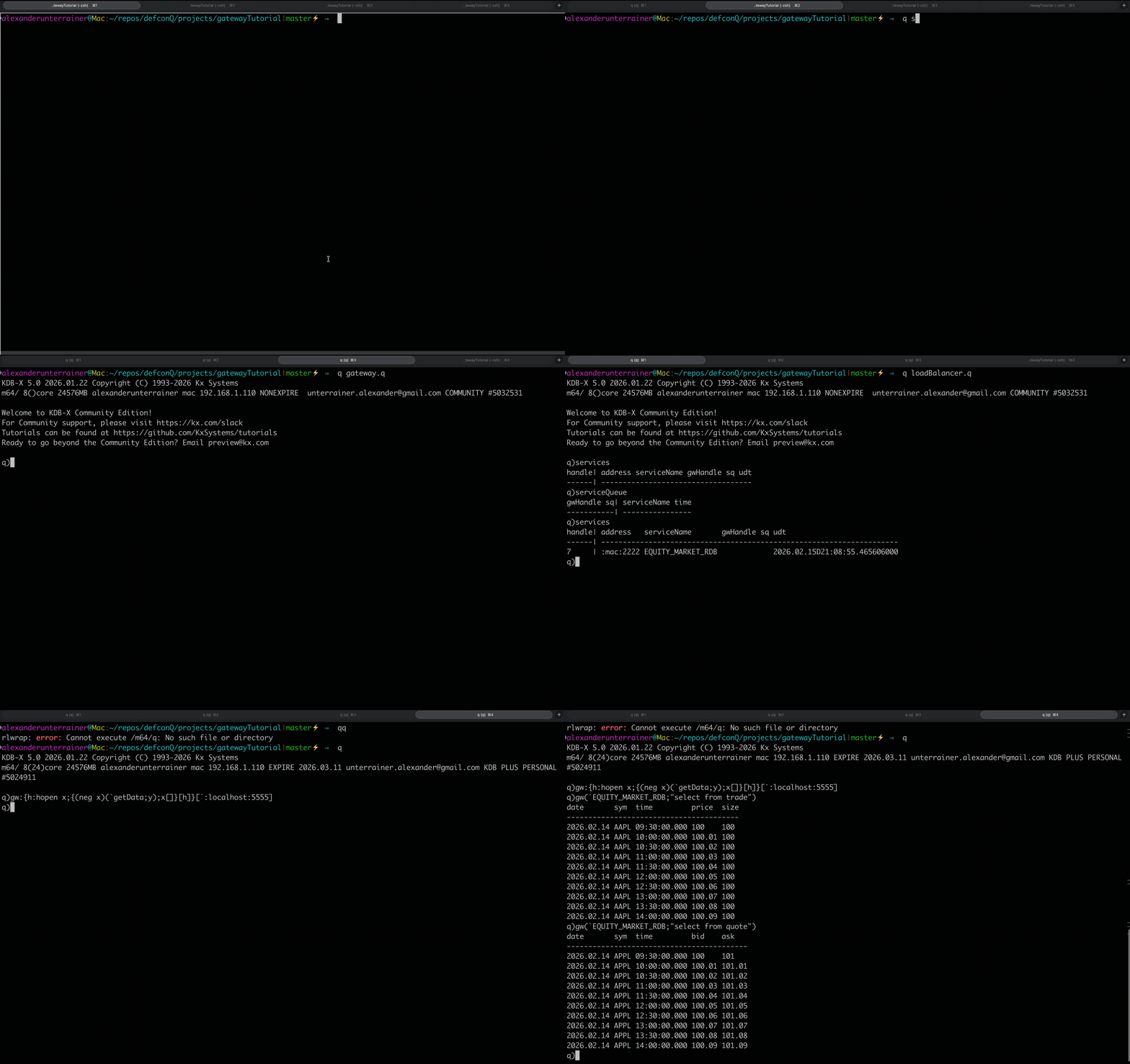
With the gateway, load balancer, and backend service all up and running, it’s time to simulate a client and push some queries through the framework.
We spin up a fresh KDB/Q process and define a helper function that allows us to submit queries to the gateway. More specifically, we create a projection that accepts two inputs: the target service name and the query to be executed. The projection establishes a connection to the gateway using the supplied connection details, then constructs a lambda that invokes the getData function asynchronously. After sending the request, it flushes the output queue to ensure the message is dispatched immediately.
This implements a deferred synchronous pattern: the client blocks while waiting for the result, but the gateway does not. That distinction is critical. The gateway must remain free to handle other incoming requests, because a gateway that blocks on the first client query isn’t much of a gateway at all.
q)gw:{h:hopen x;{(neg x)(`getData;y);x[]}[h]}[`:localhost:5555]
q)gw(`EQUITY_MARKET_RDB;"select from trade")
date       sym  time         price  size
----------------------------------------
2026.02.14 AAPL 09:30:00.000 100    100
2026.02.14 AAPL 10:00:00.000 100.01 100
2026.02.14 AAPL 10:30:00.000 100.02 100
2026.02.14 AAPL 11:00:00.000 100.03 100
2026.02.14 AAPL 11:30:00.000 100.04 100
2026.02.14 AAPL 12:00:00.000 100.05 100
2026.02.14 AAPL 12:30:00.000 100.06 100
2026.02.14 AAPL 13:00:00.000 100.07 100
2026.02.14 AAPL 13:30:00.000 100.08 100
2026.02.14 AAPL 14:00:00.000 100.09 100
Lights On: Watching the Framework Come Alive
With the line-by-line walkthrough behind us, it’s time to see the architecture in motion. Let’s run a short demonstration of the system we’ve just built and watch the components interact in real time. The illustration below highlights the full setup and how the pieces fit together. If you’d like to recreate the framework yourself, you can find the complete codebase on DefconQ’s GitHub repository.
Where Do We Go From Here? Scaling the Blueprint
This tutorial walked through a lightweight gateway-load balancer framework, breaking down the functionality and code step by step. By now, you should have a solid set of foundational building blocks, enough to evolve this simple architecture into something far more powerful.
A natural next step would be to replace the deferred synchronous pattern with the deferred response pattern introduced in KDB/Q v3.6. From there, you could expand the ecosystem: add additional backend services, refine the load balancer’s routing logic, introduce user-level permissions, or deploy multiple gateways segmented by region or asset class. The framework is intentionally minimal, the ceiling is defined only by your imagination.
As always, happy coding.
Resources
- Gateways: The Bouncer at the Front Door of Your KDB/Q Stack
- Advanced KDB/Q Architecture
- Fundamentals of Interprocess Communication (IPC)
- Beyond the Fundamentals: Next Level Interprocess Communications
- KDB Tick Explained: A Walkthrough
- KX Whitepaper: Query Routing: A kdb+ framework for a scalable, load balanced system by Kevin Holsgrove